Screenshot Tests Where the Input Is State
rk snapshot renders real Compose screens from seeded store state and diffs them against goldens. Plus a semantics dump that catches what pixel diffing misses.
Most screenshot-testing tools take a composable and some arguments and give you a PNG. f(@Composable args) → PNG. Paparazzi and Roborazzi both work this way, and they work well.
rk snapshot takes a store state and gives you a PNG. f(state) → PNG. You seed a store, dispatch into it, and it renders your real Compose screen off-screen against the resulting state.
That difference sounds academic. It’s not, and I want to show you the moment it earned its keep.
Install
brew install reduxkotlin/tap/rk # macOS / Linuxscoop bucket add reduxkotlin https://github.com/reduxkotlin/scoop-bucketscoop install rk # WindowsNo JDK required: the archives ship a jlink-minimized JRE. The macOS bottle is Apple Silicon only right now; on an Intel Mac, build from source.
The thing everyone gets wrong
The rk binary can only render its own built-in demo scenes. It has no idea what your app looks like.
To render your screens, you depend on the library and give it a scene registry:
// build.gradle.kts: test scope, so Skiko never ships in your apptestImplementation("org.reduxkotlin:redux-kotlin-snapshot:1.0.0-alpha04")val mySnapshots: SnapshotApp = snapshotApp { defaults { width = 411; height = 891; density = 2f; theme = "dark" }
scene("board") { presets("seeded", "empty") render { args -> boardScene(presetOf(args), themeOf(args.theme)) } }}
fun main(args: Array<String>) { mySnapshots.runCli(args) kotlin.system.exitProcess(0) // Skiko leaves non-daemon threads alive}A scene builds a real store, dispatches real actions, and renders the real screen. The library never deserializes your types. You hand it a preset name or a JSON blob, and your scene decodes it.
The commands
rk snapshot has no subcommands. It’s one command driven by flags.
# what can this binary render? (machine-readable)rk snapshot --list
# render one shotrk snapshot --scene board --preset seeded --out goldens/board-seeded.png
# verify it against a goldenrk snapshot --scene board --preset seeded --verify goldens/board-seeded.png
# render from arbitrary state, no preset neededrk snapshot --scene counter --state-json '{"count":3}' --out c3.png
# render the whole manifest and build a browsable dashboardrk snapshot --batch shots.json --out-dir build/snapshots --dashboardExit codes are 0 ok, 1 render or verify failure, 2 usage, because CI reads exit codes, not prose.
One flag worth calling out: in batch mode, verification is turned on by --golden-dir, not by --verify. --verify is single-shot only.
The manifest and the dashboard
The manifest is boring on purpose. This is TaskFlow’s, in full:
{ "shots": [ { "id": "board-seeded", "scene": "board", "preset": "seeded" }, { "id": "board-empty", "scene": "board", "preset": "empty" }, { "id": "settings-default", "scene": "settings", "preset": "default" }, { "id": "settings-offline", "scene": "settings", "preset": "offline-failing" }, { "id": "settings-bot", "scene": "settings", "preset": "online-bot" } ]}--dashboard writes a self-contained index.html over the run’s report.json. Cards are sorted worst-first, each showing a golden / actual / diff triptych. Click any image to zoom to 1:1 native pixels. Changed pixels are painted magenta over a dimmed copy of the actual.
Where pixel diffing quietly fails
Here is the part I actually want you to read.
While writing this post I was generating TaskFlow screenshots, and I noticed a bug in my own sample app. The card footer said “1 labels”. Classic. So I fixed it:
- text = "$labelCount labels",+ text = if (labelCount == 1) "1 label" else "$labelCount labels",Then I re-ran the batch against the goldens I had rendered five minutes earlier, expecting the golden gate to flag the change.
It didn’t.
batch: 5/5 ok, 0 failed, 0 mismatched, 0 semantics-mismatched -> build/snapshotsThe batch tolerance is 0.5%. Changing labels to label moved 0.0072% of the pixels: one character, in body-small type, on one card. It sailed under the threshold. As far as the pixel gate was concerned, nothing had changed.
That’s not a bug in the differ. Any tolerance you pick has this property, and you need a tolerance, because sub-pixel anti-aliasing noise across a batch will fail you constantly if you set it to zero. But it means a pixel gate can’t be trusted to catch a text change, which is a large fraction of the changes anyone actually makes.
The semantics dump
This is why --semantics exists. It dumps the Compose semantic node tree as text: the content, not the pixels.
rk snapshot --batch shots.json --golden-dir goldens --update-semantics # recordrk snapshot --batch shots.json --golden-dir goldens --verify-semantics # gateSame code change, same run, with the semantics gate turned on:
batch: 4/5 ok, 0 failed, 0 mismatched, 1 semantics-mismatched -> build/snapshots drift board-seeded: pixel=match semantics=mismatch png=board-seeded.png diff=- sidecar=- - "1 labels", - "1 labels", + "1 label", + "1 label",batch had 0 failed / 0 mismatched / 1 semantics-mismatchedExit code 1, and it hands you the exact diff. That’s real output, not a mock-up: pixel=match and semantics=mismatch, on the same shot, in the same run.
The dashboard puts it at the top, sorted worst-first:
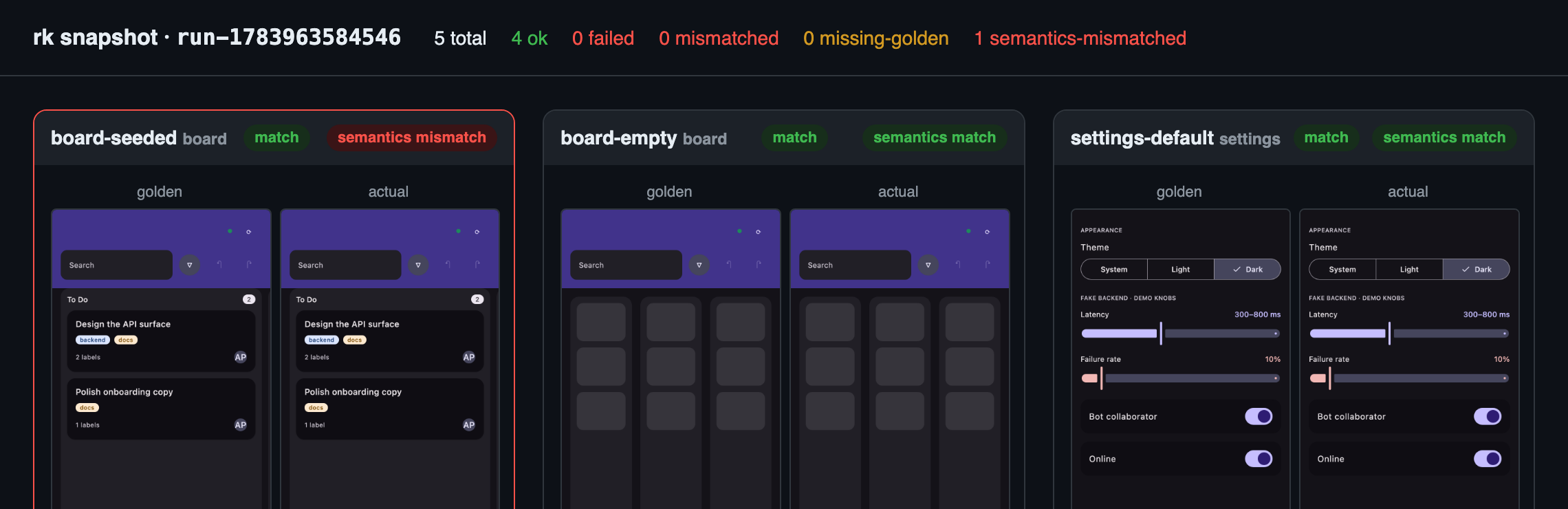
Two gates, and they catch different things. Pixels catch layout, color, spacing, and anything that moves a lot of them. Semantics catch content: the text and structure, the things a human would call “what the screen says.” Neither is a superset of the other, which is why both ship.
The three-tier loop
That gives a verify loop with three tiers, cheapest first. This ordering matters most when the thing running the loop is a coding agent, but it’s a good ordering for humans too:
- Tier 0, semantics. A text diff. Assert content deterministically: the title is
"Ship v1", the column has two cards. Zero vision tokens. Start here. - Tier 1, the golden verdict. A pass/fail line out of
report.json. Still text. No image is opened. - Tier 2, read the PNG. Only when a shot actually drifted and you need to decide whether it drifted correctly.
Most iterations never leave Tier 0. Looking at a picture is the expensive, last-resort operation, and it should be treated that way. Part 9 is where this pays off.
Sharp edges I’ve actually hit
I run this in anger on another app of mine, which has 130-odd committed goldens across 20 scenes. Three things it taught me:
- Keep per-OS golden sets. CoreText and FreeType disagree about glyph advances by enough to flip a line-wrap in a long paragraph, which then shifts an entire layout. I’ve measured a 22% pixel diff from nothing but a macOS-vs-Linux font difference. That app keeps
snapshots/macos/for the local loop andsnapshots/linux/for CI. - Pin the clock. If a scene renders a date, an unpinned clock will rot your goldens overnight. Inject it.
- Tolerance is a real dial. I run at
maxDiffPercent = 4.0, which sounds enormous until you’ve watched anti-aliasing noise fail a build for the fourth time.
The limitation
This is the least cross-platform thing in the whole series.
redux-kotlin-snapshot is JVM-only. It’s a Skiko renderer, so it needs a desktop graphics stack: it renders your Compose Multiplatform screens on the JVM and that’s that. The rk binary’s macOS bottle is Apple Silicon only. The library runs on nine targets. The tooling does not.
For an Android/desktop/iOS app sharing one Compose codebase, rendering on the JVM is fine, because they’re the same composables. If your UI diverges meaningfully per platform, this tool tests the shared part.
It’s also experimental and exempt from semver until it settles. It will move.
Full details in the snapshot testing doc.
Happy loop closing!
Sources of truth: reduxkotlin.org · github.com/reduxkotlin/redux-kotlin · the TaskFlow sample
Part 8 of ReduxKotlin 1.0.